Shipping an AI SDR Chatbot with LangSmith: What Actually Helped in Production
A real-world story of deploying an AI SDR chatbot for a loyalty platform - and how LangSmith traces, feedback, and evaluations made it shippable.

Short introduction
We shipped an AI SDR chatbot to production for a loyalty platform. The goal was simple: qualify inbound leads, answer product questions, and route the right conversations to the right humans.
The reality was more complex. In an AI SDR flow, a “small” mistake is rarely small: a wrong claim about pricing, an incorrect handoff, or a broken CRM update becomes a revenue and trust problem fast.
The difference between a demo and production wasn’t “better prompts”. It was observability. LangSmith made the system debuggable, testable, and shippable once we moved from “a chatbot” to “a stateful workflow with tools and side effects”.
Problem
The chatbot had to do more than chat. It needed to:
- answer questions grounded in current product positioning (not stale docs),
- qualify intent (is this a partner, a brand, a merchant, an agency?),
- collect a minimal set of details without feeling like a form,
- route to the right path (self-serve, book a meeting, create a ticket),
- write structured outcomes to downstream systems (e.g., lead notes, tags, and a handoff summary).
Two common problems showed up immediately:
- Quality drift on real traffic. The same prompt that “worked” in staging started failing once users asked messy, multi-part questions.
- Debugging tool + model interactions. When the agent used tools (search, retrieval, CRM write), failures often looked like generic “the model responded weirdly” until you could see the exact sequence.
And there was one failure mode we had to fix before launch:
- Occasional duplicate actions. A tiny percentage of conversations caused two lead updates instead of one. It happened rarely enough to dodge manual QA, but often enough to create operational noise.
What the workflow looked like (simplified)
We modeled the AI SDR chatbot as a LangGraph state machine: each stage is a node, and the conversation state is carried forward between nodes.
# imports skipped for brevity

class SDRState(MessagesState):
    lead_id: str
    lead: Dict[str, Any]
    score: int
    next_action: str
    kb_context: List[Document]
    thread_id: str    # For idempotency and tracing

async def retrieve_kb(state: SDRState, config: RunnableConfig) -> Dict[str, Any]:
    """Retrieve knowledge base context with error handling and validation from Qdrant vector store."""
    ...

def needs_product_qa(state: SDRState) -> str:
    """Determine if product QA is needed based on conversation state."""
    ...

# Define retry policies for reliability
kb_retry_policy = RetryPolicy(
    max_attempts=3,
    initial_interval=1.0,
    backoff_factor=2.0,
    max_interval=10.0,
    retry_on=(Exception,),  # Retry on any exception
)

graph = StateGraph(SDRState)

# add nodes
...

# add edges
graph.add_node("retrieve_kb", retrieve_kb)
graph.add_edge("intro", "qualify")
graph.add_conditional_edges("qualify", needs_product_qa)
graph.add_edge("retrieve_kb", "sales_brief")
graph.add_edge("sales_brief", "crm_write")
graph.add_edge("crm_write", END)

# Compile with checkpointer for persistence and reliability
app = graph.compile(checkpointer=PostgresSaver.from_conn_string(DB_URL))
final_state = app.invoke(input={...}, config={"configurable": {"thread_id": "lead-001"}})
The key point: once you have tool calls (CRM write, marketing trigger, scheduling), you need to debug a sequence of model + tool steps, not a single response.
Why common approaches fail
Without trace-level visibility you can’t reliably answer:
- Which prompt version produced the bad behavior?
- What context did retrieval actually return?
- Which tool call failed (or silently returned garbage)?
- Was this a retry? Did we accidentally run the same action twice?
At that point, the team becomes reactive: you patch prompts based on anecdotes and hope the next deploy is better.
Real-world constraint
In loyalty software, “just log everything” breaks quickly: you have PII constraints, fast iteration pressure, and multi-step workflows with real side effects. We needed visibility that was detailed enough to debug, but structured enough to control (redaction, sampling, environments, and clear run boundaries).
Real-world solutions (that worked) + advice
1) Use traces as your “flight recorder”
LangSmith tracing gave us an end-to-end timeline for each conversation turn: model calls, tool calls, inputs/outputs, latencies, and metadata. The practical win was being able to reproduce failures by run ID and compare behavior across prompt versions.
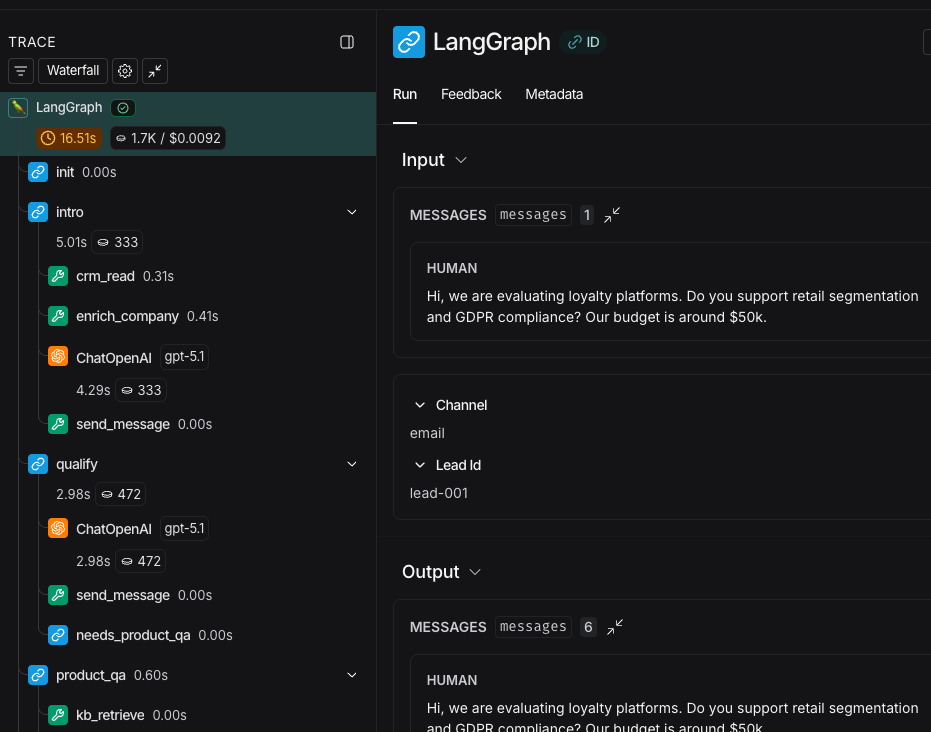
Advice: tag every run with metadata you’ll need later (environment, channel, lead type guess, prompt version, and a stable lead/thread ID). In production, “what happened?” is inseparable from “under what conditions?”
2) Turn “quality” into something you can regression test
We built a small dataset of representative conversations: objections, pricing questions, ambiguous intent, and “messy” multi-part asks. Then we used LangSmith’s evaluation workflows to run the agent against that dataset as we iterated.
This did two things:
- stopped quality from drifting silently between deployments,
- gave product and sales a concrete way to review improvements (“this set got better / worse”) instead of debating single transcripts.
Advice: keep evaluations simple at first (did we route correctly? did we extract required fields? did we stay grounded? did we avoid unsafe side effects?). You can always add nuance later.
3) Close the loop with structured feedback
An AI SDR is a living system: sales messaging changes, product features ship, and user behavior evolves. LangSmith’s feedback/annotation loop made it practical to:
- mark good/bad outcomes on real production runs,
- create a prioritized queue of “fix these” examples,
- feed the best examples back into your evaluation dataset.
Advice: don’t collect “thumbs up/down” only. Add a small taxonomy of failure categories (wrong routing, hallucination, missed required field, tone mismatch, tool failure). That’s how you turn feedback into engineering work.
The rare issue LangSmith helped us squash: duplicate actions
That duplicate-lead-update bug was painful because it was intermittent. Nothing “looked wrong” in the final assistant message; the damage was the side-effect.
Traces made it obvious: under certain latency spikes, a CRM write timed out, our agent retried, and the second attempt succeeded, but the first one actually completed shortly after. Two writes, one user turn.
Once we could see the exact tool call timing and retries in LangSmith, the fix was clear:
- make tool calls idempotent (idempotency key per conversation turn),
- separate “retry model call” from “retry side-effecting tool call”,
- add an evaluation case specifically for “no duplicate writes” on simulated timeouts.
Concretely, we treated the CRM write boundary as the place to harden:
payload = json.dumps({"lead": state["lead"], "score": state["score"], "sales_brief": state["sales_brief"]})
crm_write.invoke({"lead_id": state["lead_id"], "payload": payload, "idempotency_key": f"{thread_id}:{turn_id}"})
In production, we added an idempotency key (derived from thread_id + turn ID) and made retries explicit so a “retry” could not create a second write.
This is a great example of why observability is not just for debugging. It’s how you discover what to harden.
Takeaway
If your AI agent touches revenue operations, observability is not optional. LangSmith didn’t “make the model smarter”, it made the system understandable enough to improve, and therefore safe enough to ship.
Here's what mattered most in production for us:
- Make grounding inspectable. Use a real knowledge base retrieval step (we used Qdrant), and trace it so you can see exactly what was retrieved and under which config (prompt version, retrieval params, thread ID).
- Separate thinking from doing. Retries are normal for model calls, but they’re dangerous for side effects. Make tool calls idempotent, and make “retry the model” distinct from “retry the tool”.
- Treat quality as a regression problem. Keep a small dataset of real conversations and re-run evaluations on every meaningful change (prompt, model, retrieval settings, tool schema).
If you do only one thing: make your workflow inspectable (traces) and repeatable (evals). That combination is what turns “it kind of works” into something you can reliably iterate on.
Sources & Further Reading
Official Documentation: