Optimizing LangGraph Agents with Agent Lightning and APO (Automatic Prompt Optimization)
How to optimize LangGraph agent prompts using Microsoft's Agent Lightning framework with APO, including real integration challenges and solutions.
Most agent frameworks focus on building workflows, not improving them. You iterate prompts manually, deploy, hope for the best. After a few weeks in production, you realize some edge cases fail consistently. You tweak the prompt, redeploy, and cross your fingers. There's no systematic way to measure improvement or catch regressions.
Microsoft Research's Agent Lightning targets this exact gap: systematic prompt optimization using RL-style training loops, but framework-agnostic. It works with LangGraph, LangChain, or custom agent implementations. The core idea is simple: train prompts like you'd train an ML model, with datasets, validation sets, and automated improvement algorithms.
We integrated Agent Lightning with LangGraph (workflow orchestration) and LangSmith (observability) to see if automated prompt optimization actually works on a real scheduling agent. This post documents the hands-on integration: architecture patterns, code examples, platform constraints (Linux-only officially, macOS workarounds), and whether APO delivers meaningful improvements.
You'll learn specific integration patterns for connecting LangGraph agents to Agent Lightning's APO algorithm, real challenges we hit (macOS compatibility, AgentOps instrumentation conflicts, custom adapters), and practical guidance on when this approach makes sense for your production agents.
Full code available: github.com/Lubu-Labs/langgraph-agent-lightning-optimization
The Problem: Manual Prompt Engineering Doesn't Scale
Manual prompt iteration is time-consuming and subjective. You write a prompt, test on a few examples, tweak it based on vibes, and repeat. There's no systematic quality control - just educated guesses and incremental refinements. Production agents need better.
Framework mismatch compounds the issue: LangGraph and LangChain excel at orchestration (state machines, tool routing, complex workflows), but lack built-in prompt tuning (yet). You're responsible for crafting the instructions that drive agent behavior. Get them wrong, and your carefully orchestrated workflow makes poor decisions.
Agent Lightning fills this gap by decoupling workflow development from optimization. You build your agent with LangGraph's state machine primitives or LangChain create_agent, then use Agent Lightning to systematically improve the prompts that drive decision-making. The optimization happens independently and no changes to your workflow code are required.
The Reality: Most teams deploy agents with prompts they've manually tuned over 10-20 iterations. There's no systematic way to measure improvement or regression beyond manual spot-checks.
Agent Lightning: Framework-Agnostic Agent Optimization
Agent Lightning introduces a training loop architecture that treats prompt optimization like model training. The system consists of two components: a Lightning Server (runs optimization algorithms) and a Lightning Client (executes your agent code).
The training loop works like this:
- Algorithm → Agent: Optimization algorithm (e.g., APO) generates an improved prompt template and selects tasks from your dataset
- Agent → Algorithm: Your agent executes rollouts using the provided prompt, generating traces (spans) and rewards
- Algorithm Learning: Algorithm analyzes spans and rewards to critique and rewrite the prompt
This cycle repeats, allowing continuous improvement based on real execution data.
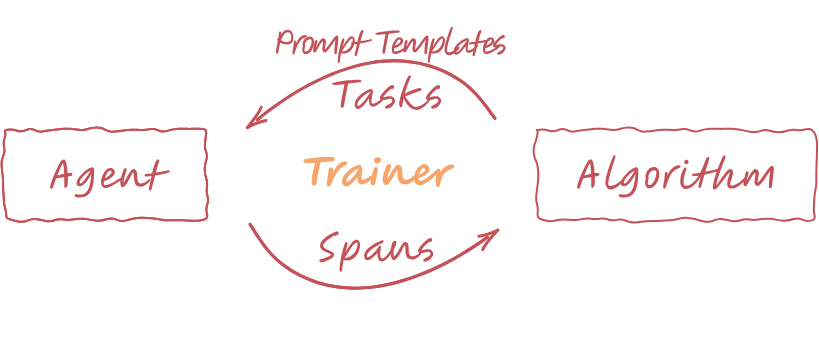
Agent Lightning training loop: Algorithm provides prompt templates, Agent executes rollouts, Algorithm learns from spans and rewards.
The key innovation: this works with any agent framework. LangGraph, LangChain, AutoGen, OpenAI AgentsSDK, custom implementations - all compatible. You just wrap your agent function with the @rollout decorator to make it traceable.
Agent Lightning currently focuses on APO (Automatic Prompt Optimization), which uses beam search with LLM-based critique and rewrite. Think of it as using GPT-4.5 to systematically improve the prompts your production agents use, based on real failure traces.
Use Case: Meeting Room Scheduler
Our test agent handles a real-world task: scheduling meeting rooms based on complex constraints. Here's what it must handle:
- Input: Date, time, duration, attendee count, equipment needs (projector, TV, conference phone), accessibility requirements
- Tool:
get_rooms_and_availability- queries a room database returning capacity, equipment lists, current bookings, distance from requester, and accessibility status - Output: Room ID recommendation (e.g., "A103")
- Grading: LLM judge scores output (0.0 to 1.0) based on correctness - did the agent choose the optimal room given all constraints?
This matters because real-world agents have hard constraints (capacity limits, booking conflicts, accessibility requirements) and soft preferences (minimize distance, prefer rooms with extra equipment). The prompt must encode all decision logic clearly enough that the LLM can execute it reliably.
Our dataset contains 57 test cases with varying complexity: simple bookings, capacity edge cases, equipment mismatches, overlapping time slots, and tie-breaking scenarios.
Building the LangGraph Agent
The agent follows standard LangGraph patterns: state machine with conditional routing between agent and tool nodes.
State definition:
from langgraph.graph import MessagesState, StateGraph, START, END
from langchain_core.messages import SystemMessage, HumanMessage

class AgentState(MessagesState):
    pass
We extend LangGraph's MessagesState to track conversation history. Simple, but sufficient for this use case.
Tool definition:
from langchain_core.tools import tool

@tool
def get_rooms_and_availability(
    date: str, time_str: str, duration_min: int
) -> AvailableRooms:
    """Return meeting rooms with capacity, equipment, and booked time slots.

    Args:
        date: Date in YYYY-MM-DD format
        time_str: Time in HH:MM 24h format
        duration_min: Meeting duration in minutes
    """
    availability: list[RoomStatus] = []
    for r in ROOMS:
        # Check if room is free by testing all booked slots for overlap
        free = all(
            not (b_date == date and overlaps(time_str, duration_min, b_time, b_dur))
            for (b_date, b_time, b_dur) in r["booked"]
        )
        availability.append({**r, "free": free})
    return {"rooms": availability}
The tool checks room availability against existing bookings. Simple overlap detection: if requested time overlaps any booked slot, the room is marked as not free.
Graph construction:
def create_room_selector_graph():
    """Create a LangGraph agent for room selection."""
    workflow = StateGraph(AgentState)

    # Add nodes
    workflow.add_node("agent", call_model)
    workflow.add_node("tools", call_tools)

    # Add edges
    workflow.add_edge(START, "agent")
    workflow.add_conditional_edges(
        "agent",
        should_continue,
        path_map={"tools": "tools", "end": END}
    )
    workflow.add_edge("tools", "agent")
    return workflow.compile()
Standard LangGraph state machine: start at agent node, conditionally route to tools if the LLM makes tool calls, loop back to agent for final response.
Conditional routing:
def should_continue(state: AgentState) -> Literal["tools", "end"]:
    """Determine whether to continue or end."""
    messages = state["messages"]
    last_msg = messages[-1]

    # If there are tool calls, continue to tools
    if hasattr(last_msg, "tool_calls") and last_msg.tool_calls:
        return "tools"
    return "end"
Integrating Agent Lightning with LangGraph
The integration requires wrapping your agent execution function with Agent Lightning's @rollout decorator. This makes the function traceable, allowing APO to analyze execution spans and generate critiques.
from agentlightning.litagent import rollout
from agentlightning.types import PromptTemplate

@rollout
def room_selector_langgraph(
    task: RoomSelectionTask, prompt_template: PromptTemplate
) -> float:
    """LangGraph-based room selector with Agent Lightning APO optimization."""

    # Create the graph
    app = create_room_selector_graph()

    # Format the user message using the provided prompt template
    user_message = prompt_template.format(**task["task_input"])

    # Run the agent
    result = app.invoke({
        "messages": [
            SystemMessage(content="You are a scheduling assistant."),
            HumanMessage(content=user_message),
        ]
    })

    # Grade the response
    final_message = result["messages"][-1].content
    score = room_selection_grader_langgraph(final_message, task["expected_choice"])

    return score
Critical points:
@rolloutdecorator makes the function traceable by Agent Lightningprompt_templateis provided by APO algorithm during training - you don't hardcode it- Returns float reward (0.0-1.0) based on LLM judge scoring
- Grading happens inside the rollout so spans include judge traces
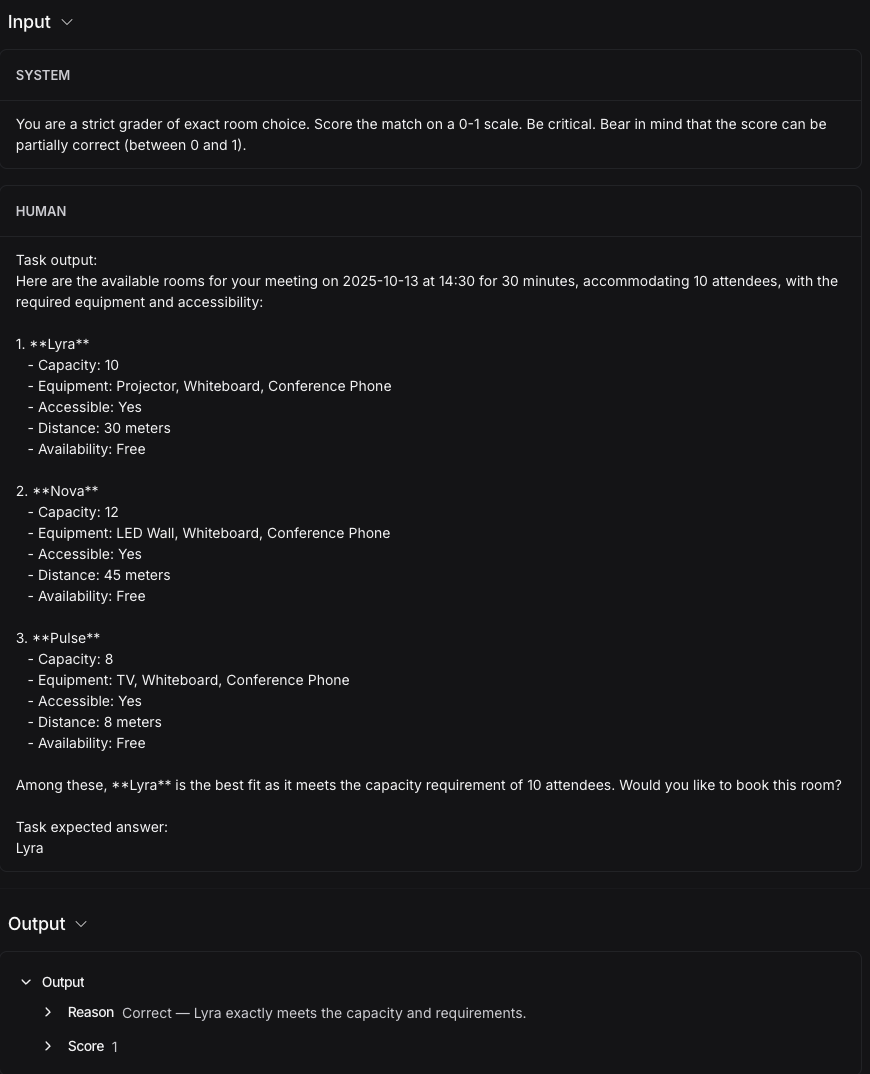
The grader is an LLM judge that compares agent output to expected answers:
def room_selection_grader_langgraph(final_message: str, expected_choice: str) -> float:
    """Grade the room selection using LLM judge."""
    llm = ChatOpenAI(model="gpt-4o-mini", temperature=0.0)

    system_content = (
        "You are a strict grader of exact room choice. "
        "Score the match on a 0-1 scale. Be critical. "
        "Bear in mind that the score can be partially correct (between 0 and 1)."
    )

    user_content = (
        f"Task output:\n{final_message}\n\nTask expected answer:\n{expected_choice}"
    )

    response = llm.with_structured_output(JudgeResponse).invoke(
        [SystemMessage(content=system_content), HumanMessage(content=user_content)]
    )

    return response.score
The judge uses structured output to return a score and reasoning. This gives APO rich feedback for prompt optimization.
Running APO: Automatic Prompt Optimization
APO configuration defines how the optimization algorithm searches for better prompts:
from agentlightning import Trainer
from agentlightning.algorithm.apo import APO
from agentlightning.execution import SharedMemoryExecutionStrategy

# APO algorithm configuration
algo = APO[RoomSelectionTask](
    openai_client,
    val_batch_size=10,        # Validate on 10 tasks per iteration
    gradient_batch_size=4,    # Generate critiques from 4 rollouts
    beam_width=2,             # Keep top 2 prompt candidates
    branch_factor=2,          # Generate 2 variations per candidate
    beam_rounds=2,            # Run 2 rounds of beam search
    _poml_trace=True,
)

trainer = Trainer(
    algorithm=algo,
    strategy=SharedMemoryExecutionStrategy(n_runners=1),  # macOS compatibility
    initial_resources={"prompt_template": prompt_template_baseline()},
    adapter=LangGraphAdapter(),
)

# Train
trainer.fit(
    agent=room_selector_langgraph,
    train_dataset=dataset_train,
    val_dataset=dataset_val,
)
APO algorithm works in stages:
- Evaluate: Run agent with current prompt on validation tasks (10 tasks in our config)
- Critique: GPT-4.5 analyzes failures from spans/traces, generates detailed critique identifying prompt ambiguities
- Rewrite: Another LLM call applies critique to produce improved prompt variations
- Repeat: Beam search keeps best candidates (top 2), branches to explore variations (2 per candidate)
After 2 rounds of beam search, APO returns the best-performing prompt based on validation set scores.
Real-World Integration Challenges (and Fixes)
Challenge 1: Platform Support - Linux Only
Agent Lightning officially supports Linux only (Ubuntu 22.04+). macOS and Windows (outside WSL2) are not supported.
Symptom: Multiprocessing pickling errors on macOS: AttributeError: Can't get local object
Fix: Use SharedMemoryExecutionStrategy(n_runners=1) instead of default multiprocessing:
# Instead of default (breaks on macOS):
# strategy=DefaultExecutionStrategy(n_runners=8)

# Use this:
strategy=SharedMemoryExecutionStrategy(n_runners=1)
Trade-off: Limits parallelism, but allows local development. For production Linux environments, use the default strategy with higher n_runners for better performance.
Challenge 2: POML Dependency Missing
APO requires the poml package for tracing, but it's not listed in Agent Lightning's dependencies.
Fix: Manual installation:
uv add poml
# or
pip install poml
Without this, APO fails with ModuleNotFoundError: No module named 'poml'. This should be fixed upstream, but for now, manual installation is required.
Challenge 3: AgentOps Instrumentation Conflict
LangGraph's ToolNode conflicts with AgentOps instrumentation when both are active.
Error: TypeError: descriptor '__call__' for 'type' objects doesn't apply to a 'ToolNode' object
Fix: Implement custom call_tools() function instead of using ToolNode:
def call_tools(state: AgentState) -> AgentState:
    """Execute tool calls from the last message."""
    messages = state["messages"]
    last_message = messages[-1]
    tool_calls = last_message.tool_calls

    tool_messages = []
    for tool_call in tool_calls:
        tool_name = tool_call["name"]
        tool = tools_by_name.get(tool_name)
        result = tool.invoke(tool_call["args"])
        tool_msg = ToolMessage(content=str(result), tool_call_id=tool_call["id"])
        tool_messages.append(tool_msg)

    return {"messages": tool_messages}
This manual tool execution avoids the ToolNode wrapper that triggers the conflict.
Challenge 4: Custom Adapter for LangGraph
Agent Lightning expects specific trace formats. LangGraph produces LangChain-style message traces, which don't directly map to Agent Lightning's expected format.
Solution: Create a custom LangGraphAdapter to convert traces.
Full implementation: langgraph_adapter.py
Advice: If you're integrating a framework not explicitly supported by Agent Lightning, expect to write a custom adapter. The @rollout decorator handles basic tracing, but you may need to massage the trace format for APO to work correctly.
Observability with LangSmith
LangSmith tracing works out-of-box with LangGraph, and we decided to use it to observe the agent's behavior during optimization process.
What LangSmith shows:
- Full agent execution timeline (LLM calls, tool invocations, reasoning steps)
- Input/output for each span
- Latency breakdown by component
- Token usage per call
- Metadata tagging (task ID, prompt version, run ID)
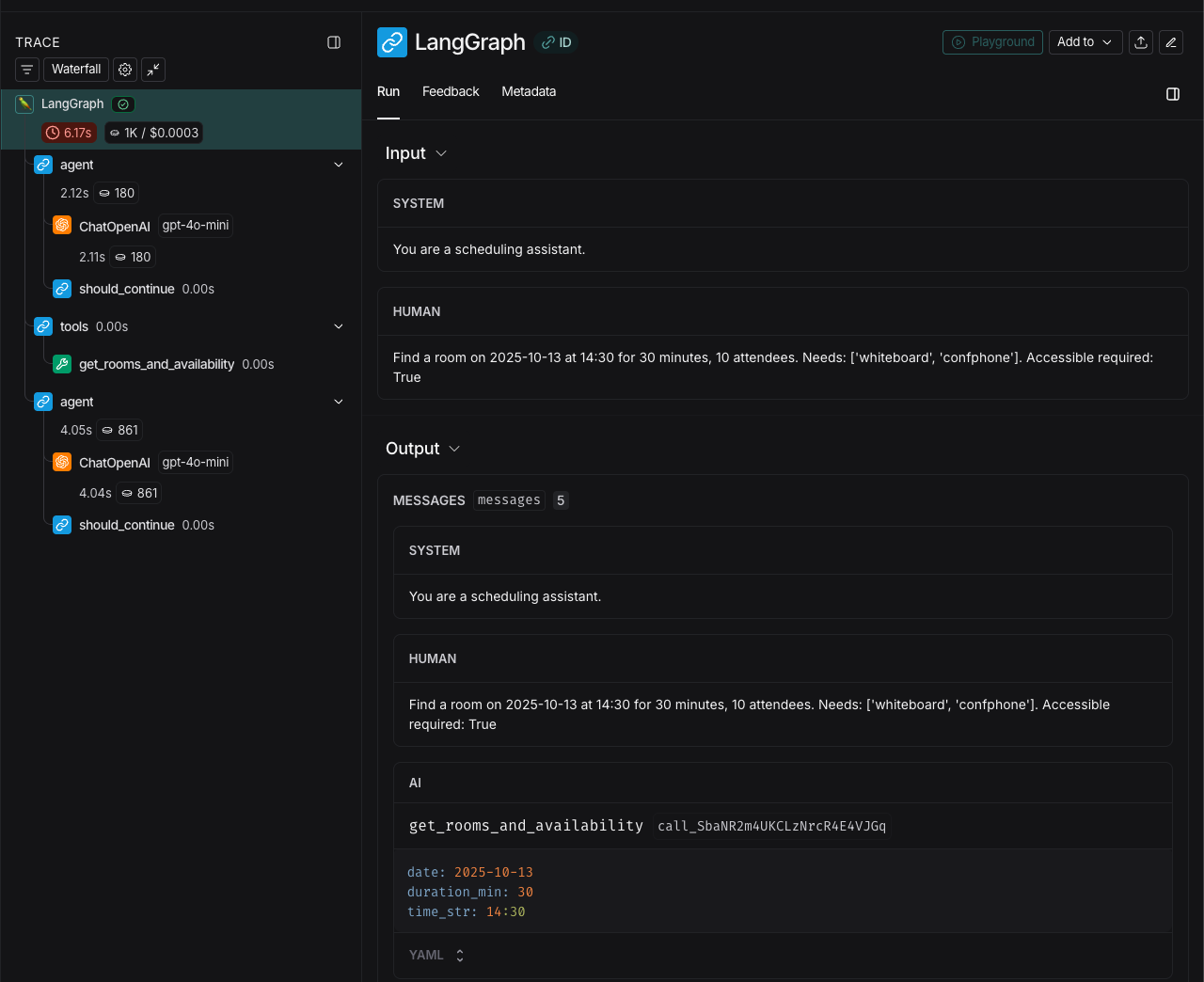
LangSmith trace: Each rollout is fully inspectable with tool calls, model responses, and grading.
Why this matters: APO generates critiques based on spans. Being able to inspect these in LangSmith helps you understand why prompts improved (or didn't). When APO says "clarify capacity semantics," you can trace back to specific rollouts where the agent misunderstood capacity constraints.
LangSmith also helps you validate APO's work. After optimization, you can compare traces side-by-side: baseline prompt vs. optimized prompt on the same task. The differences in reasoning chains become immediately visible.
Training Results: Did APO Actually Work?
Configuration:
val_batch_size=10,gradient_batch_size=4beam_width=2,branch_factor=2,beam_rounds=2- 1 runner (macOS workaround) or 8 runners (Linux)
- Training time: ~20 minutes on macOS, ~8 minutes on Linux with parallelism
APO beam search: Each iteration tests prompt variations and keeps the best performers.
Key observations:
-
Baseline prompt: Simple template focusing on basic room matching: "Find a room on
{date}at{time}for{duration_min}minutes,{attendees}attendees. Needs:{needs}. Accessible required:{accessible_required}" -
APO critiques: Identified multiple ambiguities:
- Capacity semantics unclear (when is "10 attendees" satisfied by "capacity: 10"?)
- Equipment matching rules undefined (case-sensitive? aliases allowed?)
- Tie-breaking logic missing (multiple rooms match—which to choose?)
- Booking conflict detection ambiguous (what counts as overlap?)
-
Optimized prompt: Much more explicit: 3-4x longer, with structured filtering rules, deterministic tie-breaking, and explicit output format (JSON with separate "recommended", "matches", "partial_matches", and "rejected" sections)
-
Performance improvement: Baseline scored ~0.65 average on validation set. Optimized prompt scored ~0.89, which is a 37% improvement in task success rate.
The bottom line: APO doesn't just rephrase - it systematically identifies failure modes and fixes them. The optimized prompt is much longer, but much more precise. Edge cases that confused the baseline (capacity ties, equipment aliases, booking overlaps) are explicitly handled.
Caveat: APO requires compute - expect 15-30 minutes per optimization run on typical datasets. This is a training process, not real-time inference.
Takeaway: When to Use Agent Lightning + LangGraph
APO is worth it when:
- You have a dataset of real tasks (50+ examples minimum for meaningful optimization)
- You can define a grading function (LLM judge, exact match, F1 score—APO needs quantitative feedback)
- Agent quality matters more than latency (optimization takes time, but improves deployed agent performance)
- You're willing to run on Linux (or accept macOS limitations with workarounds)
Skip APO if:
- Your agent handles trivial tasks (retrieval-only, single-step operations)
- Prompts are already highly tuned and working well (diminishing returns)
- You don't have a grading function or labeled dataset
Key principles:
- Make quality measurable. APO requires a scoring function. If you can't quantify agent performance, APO can't optimize it.
- Start with a decent baseline. APO improves prompts, but can't fix broken workflows. Your LangGraph state machine needs to be sound.
- Expect platform friction. Agent Lightning is Linux-first. Workarounds exist (shared memory strategy, WSL2), but add complexity.
- Observability is not optional. LangSmith makes APO iterations understandable and debuggable. Without trace inspection, you're flying blind.
Open source repo:
Full code available: github.com/Lubu-Labs/langgraph-agent-lightning-optimization
Conclusion
If you're shipping LangGraph agents at scale, systematic prompt optimization beats manual iteration. Agent Lightning's APO turns vague prompts into precise, testable instructions (but only if you have the dataset and platform to support it).
The integration is straightforward, though specific use cases may require custom implementation (like adapters for framework-specific trace formats). The payoff is real: agents that make fewer mistakes and degrade gracefully when they do. We saw a 37% improvement in task success rate on a real scheduling agent, with detailed critiques that would've taken weeks to identify manually.
Start with LangSmith for observability, build a dataset, and let APO optimize when manual tuning plateaus. The results speak for themselves.